The product name is DNS-323 made by D-Link.
http://www.dlink.com/products/?sec=0&pid=509#
The key technical term here is NAS (Network Area Storage), comparing with the traditional hard drive mounted inside a PC. By putting the hard drive (Storage) outside in the network, so any PC whichever connects to the network can access this storage. So sometimes people call this concept as Network Shared Storage.
Here is a nice tutorial video
http://www.dlinktv.com/?vid=1
The data stored and shared in the DNS-323 are actually secured by setting access passport in the DNS-323 via configuration. PCs/laptops, which though connect to the network but do know the password, cannot access the data stored in the DNS-323.
Here is a good example of network connection diagram (I did almost exactly the same at our home):
http://www.dlink.com/products/resource.asp?pid=509&rid=1954
The DNS-323 box has two bays and can host to hard drives (3.5 inch SATA drives at any size, say 100, 250, 500Mbytes,… ). I only use one hard drive (500Mbytes), so another bay is empty. There is an initial configuration to setup this box. Then in normal case, no more configuration is needed for regular daily use.
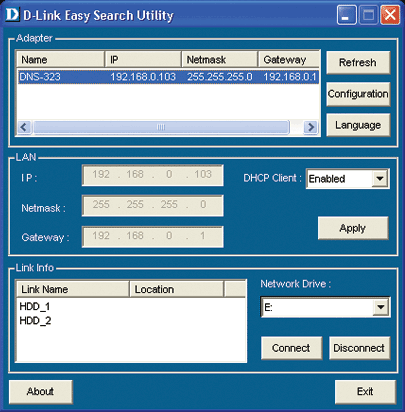
Configuration is mainly involved for
- Setting password to protect your data in this box from unwanted access
- Set IP address to this box, so other PC can recognize it.
The configuration is something like this:
http://images.dlink.com/products/DNS-323/utility.gif
Key hint:
- Assign a static (fixed) IP address to this box, so your PC and laptop can always easily recognize it
- On each PC, map DNS-322 as just another logical drive (assign a letter of your choice, e.g. I use Q:) like C:, D:, etc.. Here is the step:
Start ==> Network ==> Map Network Drive… ==> assign a letter to Drive, browse to find this DNS-323 by looking for the IP address or its alias name you ever named this box during its configuration time.
After all this necessary setup, this network hard drive will be accessible from any PC as a Q: drive on your PC whenever you connect to the home network.